Transition to Utility Access
Will my username or password change with the move to Utility Access?
No, if you already had an account with our online billing platform you will use your existing username and password.
What actions will I have to take once the transition occurs?
You will need to re-link your service accounts in the system.
If I signed up for paperless billing with the old system (Citizen Self Service) do I need to sign up for paperless billing again?
No. If you previously signed up for paperless billing, you do not need to sign up for paperless billing again in Utility Access.
I’ve never used the online portal before. What do I need to do?
You will need to create a Utility Access account, then link your individual service accounts to your newly created user account.
Do I have to create a Utility Access account to pay my utility bills online?
No, you may use the online Quick Pay feature to pay single bills online. However, we highly recommend creating a Utility Access account to better manage your utility bills and take advantage of all the features available, such as paperless billing, autopay, and account management.
What service accounts can I add to my Utility Access account?
All customers can link their water/wastewater account to their Utility Access account. Additionally, City of Lancaster residents can also link their trash bills to their Utility Access account.
Am I required to use online billing?
No. Online billing is optional. It is offered as a convenience to customers, but customers who wish to still receive/pay bills through the mail can continue to do so.
Why does my trash and recycling account show a write-off?
Trash bills are sent to collections sixty (60) days after they are due. This date is listed on your bill as the penalty date. At that point, payment for your delinquent account is only accepted by the collection agency (Creditech, 1-866-300-1721) and cannot be paid to the City of Lancaster.
Do I pay my Real Estate Tax bills through Utility Access?
No. Currently, tax bills are still paid through Citizen Self-Service.
Payment Processing Fees
Why is there a payment processing fee?
All online payment processing companies charge a fee to use their service, which they use to maintain the infrastructure necessary to keep their systems running. Payment processing fees are charged directly by the payment processor and are not collected by the City of Lancaster. Processing fees are the responsibility of the customer. You will see a separate transaction on your bank statement for the processing fee, which is paid directly to the processing company. This separate fee is also noted on your receipt.
Have payment processing fees changed?
For the most part, no. Credit cards still have a 3.25% fee, however there is now a $2.50 minimum fee to use a credit card. The fee to use a checking account remains $1.05.
Can I get a reduced payment processing fee?
Customers enrolled in paperless billing receive a $1.05 per invoice credit, equal to the fee to pay your bill with a checking account. This discount begins on invoices generated after signing up, and is made possible by not having to print paper bills or pay for postage.
Autopay
Am I required to use autopay?
No. Autopay is an optional service provided as a convenience to our customers.
How do I set up autopay?
Once you create a Utility Access account and link your individual service accounts, you will be able to setup autopay.
What payment methods are accepted?
The same methods accepted for online payments: credit cards (Visa, Mastercard, Discover) and checking accounts.
Can I pause autopay?
Yes, you can temporarily pause autopay. Please note, if you pause autopay, you are still responsible for making any necessary payments to satisfy your account.
Can I cancel autopay?
Yes, you can cancel autopay. Please note, if you cancel autopay, you are still responsible for making any necessary payments to satisfy your account.
Can I make a manual payment on my account before my autopay date?
Yes, payments can be made manually even with autopay set up on your account.
How will I know when my autopay is deducted from my account?
Your payment will be drafted from your account on your bill’s due date. You will receive an email confirmation when this occurs.
Quick Pay
Do I have to have an account to pay my bill online?
No. You can use the Quick Pay option to pay your bill online. However, customers with accounts are eligible for paperless billing, autopay, and more tools to manage their service accounts.
What payment methods can I use with Quick Pay?
The same methods accepted for online payments: credit cards (Visa, Mastercard, Discover) and checking accounts.
What do I need to use Quick Pay?
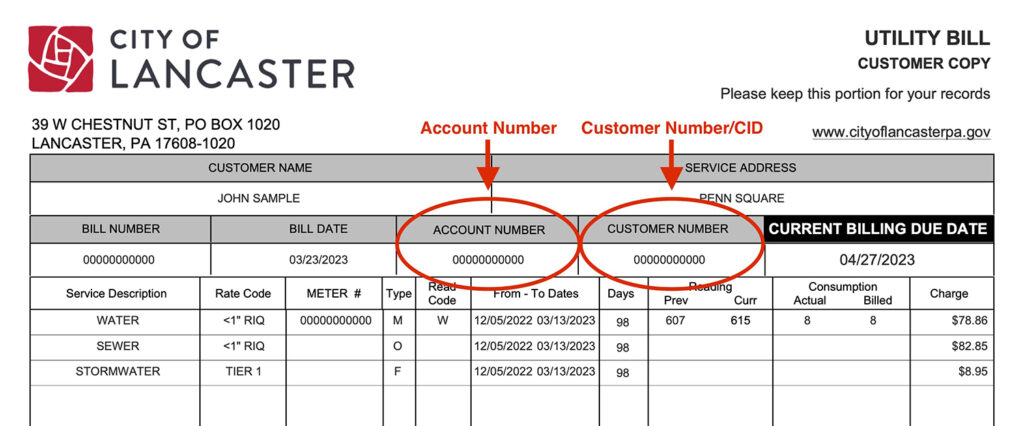
You will need both your Account Number and your Customer Number, which can be found on your bill.
Are payment processing fees different when using Quick Pay?
No, the payment processing fees are the same.
How do I get a receipt for a Quick Pay payment?
You must provide an email address when making a Quick Pay payment. You will receive a receipt via email to this address.
Payment Troubles
Having trouble with your checking account payment being accepted?
Did you open a new bank account? If so, you will need to update your payment method information in your Utility Access account.
Double check your checking account number and routing number.
If you still have problems, you will need to contact your bank directly to resolve this issue. Please note, the City of Lancaster can not contact your bank on your behalf.
Having trouble with your credit card payment being accepted?
Has your credit card expired? If so, you will need to update your payment method information in your Utility Access account.
Your card issuer may be blocking the transaction. You will need to call them directly to resolve this issue. Please note, the City of Lancaster can not contact your card issuer on your behalf.
Platform
What is Tyler Portico and MunicipalOnlinePayments.com?
Tyler Portico is the single sign-on service used to sign in to Utility Access. Similarly, MunicipalOnlinePayments.com is the customer-facing address for Utility Access. Both services are provided by Tyler Technologies, which is the company that makes the underlying software the City of Lancaster uses to manage its utility and service billing. Click here to learn more about Tyler Portico.
How can I keep my account secure?
The best way to keep your account safe is to set up multi-factor authentication (MFA) on your Utility Access account. This second layer of verification uses something other than your username and password (text message, email, code generator) to make sure only you are accessing your account. Click here to learn more about adding MFA to your account.
Monthly Billing
My monthly water utility bill seems too high. Why could that be?
You could have a leak in your property causing unusually high water usage. Check your plumbing fixtures (sinks, toilets, water spigots, etc.) for leaks.
Are water utility customers charged for actual usage or estimated usage?
Water utility customers are charged for actual water usage. The only time an estimated usage would be billed is if there is an error reading the meter, which would result in a “W” reading code on your bill.
If your bill reflects a meter read code of “W”, the City cannot remotely obtain a meter reading and will need access to your property to diagnose the problem. Please contact the Water Meter Shop at (717) 291-4820.
Did water rates increase with the change to monthly billing?
Click here to view all current water and sewer rates. (PDF)
Why doesn’t my bill display my actual water usage? How can I view my actual water usage?
Your water bill shows your actual previous and current meter reading. You can subtract your previous reading from your current reading to see your actual water usage.
What is the “Consumption” figure and why is it a whole number?
Water is billed in whole units of 1,000 gallons. Partial usage carries over and is billed once it accumulates to a full 1,000-gallon unit. For example, Consumption = 2, means you are being billed for 2,000 gallons of water consumption. Sewer billing is based on water consumption.
How does the City know how much water I use?
The City bills water based on actual usage. Over the last several years, water meters throughout the distribution system have been updated/replaced to enable more frequent and remote readings.
If your bill reflects a meter read code of “W”, the City cannot remotely obtain a meter reading and will need access to your property to diagnose the problem. Please contact the Water Meter Shop at (717) 291-4820.
How many days are in a monthly billing cycle?
On average, there are 30–35 days in each monthly billing cycle. The total number of days in your billing cycle can vary based on weekends, holidays, etc.
Where can I find my Account Number and Customer Number?
You can find both of these numbers on your bill.